lambda 表达式
表达式
[capture](parameters) -> return-type
{
    // code
}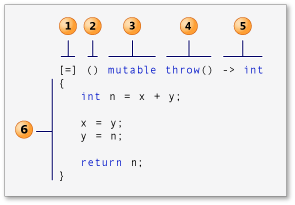
- capture 子句(在 C++ 规范中也称为 Lambda 引导。)
- 参数列表(可选)。 (也称为 Lambda 声明符)
- mutable 规范(可选)。
- exception-specification(可选)。
- trailing-return-type(可选)。
- Lambda 体。
capture 子句
Lambda 可在其主体中引入新的变量(用 C++14),它还可以访问(或“捕获”)周边范围内的变量。 Lambda 以 capture 子句开头。 它指定捕获哪些变量,以及捕获是通过值还是通过引用进行的。 有与号 (&) 前缀的变量通过引用进行访问,没有该前缀的变量通过值进行访问。
空 capture 子句 [ ] 指示 lambda 表达式的主体不访问封闭范围中的变量。
可以使用默认捕获模式来指示如何捕获 Lambda 体中引用的任何外部变量:
[&] 表示通过引用捕获引用的所有变量
[=] 表示通过值捕获它们
可以使用默认捕获模式,然后为特定变量显式指定相反的模式。 例如,如果 lambda 体通过引用访问外部变量 total 并通过值访问外部变量 factor,则以下 capture 子句等效:
[&total, factor]
[factor, &total]
[&, factor]
[=, &total]
使用默认捕获时,只有 Lambda 体中提及的变量才会被捕获。
如果 capture 子句包含默认捕获 &,则该 capture 子句的捕获中没有任何标识符可采用 &identifier 形式。同样,如果 capture 子句包含默认捕获 =,则该 capture 子句没有任何捕获可采用 =identifier 形式。
标识符或 this 在 capture 子句中出现的次数不能超过一次。
以下代码片段给出了一些示例:
struct S { void f(int i); };

void S::f(int i) {
    [&, i]{};      // OK
    [&, &i]{};     // ERROR: i preceded by & when & is the default
    [=, this]{};   // ERROR: this when = is the default
    [=, *this]{ }; // OK: captures this by value. See below.
    [i, i]{};      // ERROR: i repeated
}捕获后跟省略号是一个包扩展,如以下可变参数模板示例中所示:
template<class... Args>
void f(Args... args) {
    auto x = [args...] { return g(args...); };
    x();
}
要在类成员函数体中使用 Lambda 表达式,请将 this 指针传递给 capture 子句,以提供对封闭类的成员函数和数据成员的访问权限。
Visual Studio 2017 版本 15.3 及更高版本(在 /std:c++17 模式及更高版本中可用):可以通过在 capture 子句中指定 *this 通过值捕获 this 指针。 通过值捕获会将整个闭包复制到调用 Lambda 的每个调用站点。(闭包是封装 Lambda 表达式的匿名函数对象)。当 Lambda 在并行或异步操作中执行时,通过值捕获非常有用。 它在某些硬件体系结构(如 NUMA)上特别有用。
有关展示如何将 Lambda 表达式与类成员函数一起使用的示例,请参阅 Lambda 表达式示例中的“示例:在方法中使用 Lambda 表达式”。
在使用 capture 子句时,建议你记住以下几点(尤其是使用采取多线程的 Lambda 时):
- 引用捕获可用于修改外部变量,而值捕获却不能实现此操作。 (
mutable允许修改副本,而不能修改原始项。) - 引用捕获会反映外部变量的更新,而值捕获不会。
- 引用捕获引入生存期依赖项,而值捕获却没有生存期依赖项。 当 Lambda 以异步方式运行时,这一点尤其重要。 如果在异步 Lambda 中通过引用捕获局部变量,该局部变量将很容易在 Lambda 运行时消失。 代码可能会导致在运行时发生访问冲突。
通用捕获 (C++14)
在 C++14 中,可以在 capture 子句中引入和初始化新变量,而无需将这些变量存在于 lambda 函数的封闭范围内。 初始化可以表示任意表达式;且将从该表达式生成的类型推导新变量的类型。 借助此功能,你可以从周边范围捕获只移动的变量(例如 std::unique_ptr)并在 Lambda 中使用它们。
pNums = make_unique<vector<int>>(nums);
//...
      auto a = [ptr = move(pNums)]()
        {
           // use ptr
        };
参数列表
Lambda 既可以捕获变量,也可以接受输入参数。 参数列表(在标准语法中称为 Lambda 声明符)是可选的,它在大多数方面类似于函数的参数列表。
auto y = [] (int first, int second)
{
    return first + second;
};
在 C++14 中,如果参数类型是泛型,则可以使用 auto 关键字作为类型说明符。 此关键字将告知编译器将函数调用运算符创建为模板。 参数列表中的每个 auto 实例等效于一个不同的类型参数。
auto y = [] (auto first, auto second)
{
    return first + second;
};
Lambda 表达式可以将另一个 Lambda 表达式作为其自变量。 有关详细信息,请参阅 Lambda 表达式示例一文中的“高阶 Lambda 表达式”。
由于参数列表是可选的,因此在不将自变量传递到 Lambda 表达式,并且其 Lambda 声明符不包含 exception-specification、trailing-return-type 或 mutable 的情况下,可以省略空括号。
mutable 规范
通常,Lambda 的函数调用运算符是 const-by-value,但对 mutable 关键字的使用可将其取消。它不产生 mutable 数据成员。 利用 mutable 规范,Lambda 表达式的主体可以修改通过值捕获的变量。 本文后面的一些示例将展示如何使用 mutable。
异常规范
你可以使用 noexcept 异常规范来指示 Lambda 表达式不会引发任何异常。 与普通函数一样,如果 Lambda 表达式声明 noexcept 异常规范且 Lambda 体引发异常,Microsoft C++ 编译器将生成警告 C4297,如下所示:
// throw_lambda_expression.cpp
// compile with: /W4 /EHsc
int main() // C4297 expected
{
   []() noexcept { throw 5; }();
}有关详细信息,请参阅异常规范 (throw)。
返回类型
将自动推导 Lambda 表达式的返回类型。 无需使用 auto 关键字,除非指定了 trailing-return-type。 trailing-return-type 类似于普通函数或成员函数的 return-type 部分。 但是,返回类型必须跟在参数列表的后面,你必须在返回类型前面包含 trailing-return-type 关键字 ->。
如果 Lambda 体仅包含一个返回语句,则可以省略 Lambda 表达式的 return-type 部分。 或者,在表达式未返回值的情况下。 如果 lambda 体包含单个返回语句,编译器将从返回表达式的类型推导返回类型。 否则,编译器会将返回类型推导为 void。 下面的示例代码片段说明了这一原则:
auto x1 = [](int i){ return i; }; // OK: return type is int
auto x2 = []{ return{ 1, 2 }; };  // ERROR: return type is void, deducing
                                  // return type from braced-init-list isn't valid
lambda 表达式可以生成另一个 lambda 表达式作为其返回值。 有关详细信息,请参阅 Lambda 表达式示例中的“高阶 Lambda 表达式”。
Lambda 体
Lambda 表达式的 Lambda 体是一个复合语句。 它可以包含普通函数或成员函数体中允许的任何内容。 普通函数和 lambda 表达式的主体均可访问以下变量类型:
- 从封闭范围捕获变量,如前所述。
- 参数。
- 本地声明变量。
- 类数据成员(在类内部声明并且捕获
this时)。 - 具有静态存储持续时间的任何变量(例如,全局变量)。
以下示例包含通过值显式捕获变量 n 并通过引用隐式捕获变量 m 的 lambda 表达式:
// captures_lambda_expression.cpp
// compile with: /W4 /EHsc
#include <iostream>

using namespace std;

int main()
{
   int m = 0;
   int n = 0;
   [&, n] (int a) mutable { m = ++n + a; }(4);
   cout << m << endl << n << endl;
}
Output
5
0
由于变量 n 是通过值捕获的,因此在调用 lambda 表达式后,变量的值仍保持 0 不变。mutable 规范允许在 Lambda 中修改 n。
Lambda 表达式只能捕获具有自动存储持续时间的变量。 但是,可以在 Lambda 表达式体中使用具有静态持续存储时间的变量。
以下示例使用 generate 函数和 lambda 表达式为 vector 对象中的每个元素赋值。 lambda 表达式将修改静态变量以生成下一个元素的值。
void fillVector(vector<int>& v)
{
    // A local static variable.
    static int nextValue = 1;

    // The lambda expression that appears in the following call to
    // the generate function modifies and uses the local static
    // variable nextValue.
    generate(v.begin(), v.end(), [] { return nextValue++; });
    //WARNING: this isn't thread-safe and is shown for illustration only
}
有关详细信息,请参阅 generate。由于局部静态变量的生命周期和全局变量类似(在程序的整个运行期间都有效),Lambda表达式可以直接访问这些变量,无需显式捕获。
下面的代码示例使用上一示例中的函数,并添加了使用 C++ 标准库算法 generate_n 的 Lambda 表达式的示例。 该 lambda 表达式将 vector 对象的元素指派给前两个元素之和。 使用了 mutable 关键字,使 Lambda 表达式主体可以修改 Lambda 表达式通过值捕获的外部变量 x 和 y 的副本。 由于 lambda 表达式通过值捕获原始变量 x 和 y,因此它们的值在 lambda 执行后仍为 1。
// compile with: /W4 /EHsc
#include <algorithm>
#include <iostream>
#include <vector>
#include <string>

using namespace std;

template <typename C> void print(const string& s, const C& c) {
    cout << s;

    for (const auto& e : c) {
        cout << e << " ";
    }

    cout << endl;
}

void fillVector(vector<int>& v)
{
    // A local static variable.
    static int nextValue = 1;

    // The lambda expression that appears in the following call to
    // the generate function modifies and uses the local static
    // variable nextValue.
    generate(v.begin(), v.end(), [] { return nextValue++; });
    //WARNING: this isn't thread-safe and is shown for illustration only
}

int main()
{
    // The number of elements in the vector.
    const int elementCount = 9;

    // Create a vector object with each element set to 1.
    vector<int> v(elementCount, 1);

    // These variables hold the previous two elements of the vector.
    int x = 1;
    int y = 1;

    // Sets each element in the vector to the sum of the
    // previous two elements.
    generate_n(v.begin() + 2,
        elementCount - 2,
        [=]() mutable throw() -> int { // lambda is the 3rd parameter
        // Generate current value.
        int n = x + y;
        // Update previous two values.
        x = y;
        y = n;
        return n;
    });
    print("vector v after call to generate_n() with lambda: ", v);

    // Print the local variables x and y.
    // The values of x and y hold their initial values because
    // they are captured by value.
    cout << "x: " << x << " y: " << y << endl;

    // Fill the vector with a sequence of numbers
    fillVector(v);
    print("vector v after 1st call to fillVector(): ", v);
    // Fill the vector with the next sequence of numbers
    fillVector(v);
    print("vector v after 2nd call to fillVector(): ", v);
}
Output
vector v after call to generate_n() with lambda: 1 1 2 3 5 8 13 21 34
x: 1 y: 1
vector v after 1st call to fillVector(): 1 2 3 4 5 6 7 8 9
vector v after 2nd call to fillVector(): 10 11 12 13 14 15 16 17 18
有关详细信息,请参阅 generate_n。
constexpr Lambda 表达式
Visual Studio 2017 版本 15.3 及更高版本(在 /std:c++17 模式和更高版本中可用):
在常量表达式中允许初始化捕获或引入的每个数据成员时,可以将 Lambda 表达式声明为 constexpr(或在常量表达式中使用它)。
    int y = 32;
    auto answer = [y]() constexpr
    {
        int x = 10;
        return y + x;
    };

    constexpr int Increment(int n)
    {
        return [n] { return n + 1; }();  // ()是立即调用
    }
如果 Lambda 结果满足 constexpr 函数的要求,则 Lambda 是隐式的 constexpr:
    auto answer = [](int n)
    {
        return 32 + n;
    };

    constexpr int response = answer(10);
如果 Lambda 是隐式或显式的 constexpr,则转换为函数指针将生成 constexpr 函数:
    auto Increment = [](int n)
    {
        return n + 1;
    };

    constexpr int(*inc)(int) = Increment;
调用 Lambda 表达式
常见的调用 Lambda 表达式的情形:
- 直接调用:
device_parser("device_name");在这种情况下,Lambda 表达式被赋值给了一个变量
device_parser,并可以像调用普通函数一样通过这个变量名后跟参数列表来调用。 - 作为参数传递:
如果有函数或方法接受函数指针、函数对象或其他可调用对象作为参数,device_parser可以作为参数传递。例如:some_function(device_parser); - 存储为函数对象:
Lambda 可以存储在标准库容器或其他结构中,以供后续调用。例如:std::vector<std::function<void(const char*)>> parsers; parsers.push_back(device_parser); parsers[0]("device_name");
如果要确定这个 Lambda 函数是否被调用,需要查看完整的代码上下文。只有在调用了存储 Lambda 的变量 device_parser 的地方(带有相应的参数),这个 Lambda 函数才被执行。
Lambda 表达式语法
本文演示了 lambda 表达式的语法和结构化元素。 有关 Lambda 表达式的说明,请参阅 Lambda 表达式。
函数对象与 lambda
函数指针是一种指向函数的指针,可以用来调用函数。函数对象是一种可以存储函数的对象,可以用来调用函数。两者有一些相似之处,但也有一些不同之处。
- 函数指针可以在编译时定义,而函数对象只能在运行时定义。
- 函数指针可以指向任何函数,而函数对象只能指向特定的函数。
总的来说,函数指针更适合用于快速调用函数,而函数对象更适合用于存储函数以便于后续调用。
当你编写代码时,可能会使用函数指针和函数对象来解决问题和执行计算,尤其是当使用 C++ 标准库算法时。 函数指针和函数对象各有利弊。例如,函数指针具有最低的语法开销,但不保持范围内的状态,函数对象可保持状态,但需要类定义的语法开销。
lambda 结合了函数指针和函数对象的优点并避免其缺点(lambda通过建立匿名函数对象实现)。 与函数对象一样,lambda 是灵活的并且可以保持状态,但与函数对象不同之处在于其简洁的语法不需要显式类定义。 使用 lambda,你可以编写出比等效的函数对象代码更简洁、更不容易出错的代码。
以下示例将比较 lambda 的用途和函数对象的用途。 第一个示例使用 lambda 向控制台打印 vector 对象中的每个元素是偶数还是奇数。 第二个示例使用函数对象来完成相同任务。
示例 1:使用 lambda
此示例将一个 lambda 传递给 for_each 函数。 该 lambda 打印一个结果,该结果指出 vector 对象中的每个元素是偶数还是奇数。
代码
// even_lambda.cpp
// compile with: cl /EHsc /nologo /W4 /MTd
#include <algorithm>
#include <iostream>
#include <vector>

using namespace std;

int main()
{
   // Create a vector object that contains 9 elements.
   vector<int> v;
   for (int i = 1; i < 10; ++i) {
      v.push_back(i);
   }

   // Count the number of even numbers in the vector by
   // using the for_each function and a lambda.
   int evenCount = 0;
   for_each(v.begin(), v.end(), [&evenCount] (int n) {
      cout << n;
      if (n % 2 == 0) {
         cout << " is even " << endl;
         ++evenCount;
      } else {
         cout << " is odd " << endl;
      }
   });

   // Print the count of even numbers to the console.
   cout << "There are " << evenCount
        << " even numbers in the vector." << endl;
}
Output
1 is odd
2 is even
3 is odd
4 is even
5 is odd
6 is even
7 is odd
8 is even
9 is odd
There are 4 even numbers in the vector.
注释
在此示例中,for_each 函数的第三个参数是一个 lambda。 [&evenCount] 部分指定表达式的捕获子句,(int n) 指定参数列表,剩余部分指定表达式的主体。
示例 2:使用函数对象
有时 lambda 过于庞大,无法在上一示例的基础上大幅度扩展。 下一示例将函数对象(而非 lambda)用于 for_each 函数以产生与示例 1 相同的结果。 两个示例都在 vector 对象中存储偶数的个数。 为保持运算的状态,FunctorClass 类通过引用存储 m_evenCount 变量作为成员变量。 为了执行运算,FunctorClass 将实现函数调用运算符 operator()。 Microsoft C++ 编译器生成的代码与示例 1 中的 lambda 代码在大小和性能上相差无几。 对于类似本文中示例的基本问题,较为简单的 lambda 设计可能优于函数对象设计。 但是,如果你认为该功能在将来可能需要重大扩展,则使用函数对象设计,这样代码维护会更简单。
有关 operator() 的详细信息,请参阅函数调用。 有关 for_each 函数的详细信息,请参阅 for_each。
代码
// even_functor.cpp
// compile with: /EHsc
#include <algorithm>
#include <iostream>
#include <vector>

using namespace std;

class FunctorClass
{
public:
    // The required constructor for this example.
    explicit FunctorClass(int& evenCount)
        : m_evenCount(evenCount) { }

    // The function-call operator prints whether the number is
    // even or odd. If the number is even, this method updates
    // the counter.
    void operator()(int n) const {
        cout << n;

        if (n % 2 == 0) {
            cout << " is even " << endl;
            ++m_evenCount;
        } else {
            cout << " is odd " << endl;
        }
    }

private:
    // Default assignment operator to silence warning C4512.
    FunctorClass& operator=(const FunctorClass&);

    int& m_evenCount; // the number of even variables in the vector.
};

int main()
{
    // Create a vector object that contains 9 elements.
    vector<int> v;
    for (int i = 1; i < 10; ++i) {
        v.push_back(i);
    }

    // Count the number of even numbers in the vector by
    // using the for_each function and a function object.
    int evenCount = 0;
    for_each(v.begin(), v.end(), FunctorClass(evenCount));

    // Print the count of even numbers to the console.
    cout << "There are " << evenCount
        << " even numbers in the vector." << endl;
}
Output
1 is odd
2 is even
3 is odd
4 is even
5 is odd
6 is even
7 is odd
8 is even
9 is odd
There are 4 even numbers in the vector.
Lambda 表达式示例
声明 Lambda 表达式
示例 1
由于 lambda 表达式已类型化,所以你可以将其指派给 auto 变量或 function 对象,如下所示:
// declaring_lambda_expressions1.cpp
// compile with: /EHsc /W4
#include <functional>
#include <iostream>

int main()
{
    using namespace std;

    // Assign the lambda expression that adds two numbers to an auto variable.
    auto f1 = [](int x, int y) { return x + y; };

    cout << f1(2, 3) << endl;

    // Assign the same lambda expression to a function object.
    function<int(int, int)> f2 = [](int x, int y) { return x + y; };

    cout << f2(3, 4) << endl;
}
此示例产生以下输出:
5
7
注解
有关详细信息,请参阅 auto、function 类和函数调用。
虽然 lambda 表达式多在函数的主体中声明,但是可以在初始化变量的任何地方声明。
示例 2
Microsoft C++ 编译器将在声明而非调用 lambda 表达式时,将表达式绑定到捕获的变量。 以下示例显示一个通过值捕获局部变量 i 并通过引用捕获局部变量 j 的 lambda 表达式。 由于 lambda 表达式通过值捕获 i,因此在程序后面部分中重新指派 i 不影响该表达式的结果。 但是,由于 lambda 表达式通过引用捕获 j,因此重新指派 j 会影响该表达式的结果。
// declaring_lambda_expressions2.cpp
// compile with: /EHsc /W4
#include <functional>
#include <iostream>

int main()
{
   using namespace std;

   int i = 3;
   int j = 5;

   // The following lambda expression captures i by value and
   // j by reference.
   function<int (void)> f = [i, &j] { return i + j; };

   // Change the values of i and j.
   i = 22;
   j = 44;

   // Call f and print its result.
   cout << f() << endl;
}
此示例产生以下输出:
Output
47调用 Lambda 表达式
你可以立即调用 Lambda 表达式,如下面的代码片段所示。 第二个代码片段演示如何将 lambda 作为自变量传递给标准库算法,例如 find_if。
示例 1
以下示例声明的 lambda 表达式将返回两个整数的总和并使用自变量 5 和 4 立即调用该表达式:
// calling_lambda_expressions1.cpp
// compile with: /EHsc
#include <iostream>

int main()
{
   using namespace std;
   int n = [] (int x, int y) { return x + y; }(5, 4);
   cout << n << endl;
}
此示例产生以下输出:
Output
9示例 2
以下示例将 Lambda 表达式作为自变量传递给 find_if 函数。 如果 lambda 表达式的参数是偶数,则返回 true。
// calling_lambda_expressions2.cpp
// compile with: /EHsc /W4
#include <list>
#include <algorithm>
#include <iostream>

int main()
{
    using namespace std;

    // Create a list of integers with a few initial elements.
    list<int> numbers;
    numbers.push_back(13);
    numbers.push_back(17);
    numbers.push_back(42);
    numbers.push_back(46);
    numbers.push_back(99);

    // Use the find_if function and a lambda expression to find the
    // first even number in the list.
    const list<int>::const_iterator result =
        find_if(numbers.begin(), numbers.end(),[](int n) { return (n % 2) == 0; });

    // Print the result.
    if (result != numbers.end()) {
        cout << "The first even number in the list is " << *result << "." << endl;
    } else {
        cout << "The list contains no even numbers." << endl;
    }
}
此示例产生以下输出:
Output
The first even number in the list is 42.注解
有关 find_if 函数的详细信息,请参阅 find_if。 有关执行公共算法的 C++ 标准库函数的详细信息,请参阅 <algorithm>。
[本文内容]
嵌套 Lambda 表达式
示例
你可以将 lambda 表达式嵌套在另一个中,如下例所示。 内部 lambda 表达式将其自变量与 2 相乘并返回结果。 外部 lambda 表达式通过其自变量调用内部 lambda 表达式并在结果上加 3。
// nesting_lambda_expressions.cpp
// compile with: /EHsc /W4
#include <iostream>

int main()
{
    using namespace std;

    // The following lambda expression contains a nested lambda
    // expression.
    int timestwoplusthree = [](int x) { return [](int y) { return y * 2; }(x) + 3; }(5);

    // Print the result.
    cout << timestwoplusthree << endl;
}
此示例产生以下输出:
Output
13注解
在该示例中,[](int y) { return y * 2; } 是嵌套的 lambda 表达式。
[本文内容]
高阶 Lambda 函数
示例
许多编程语言支持“高阶函数”的概念。高阶函数是一个 lambda 表达式,它采用另一个 lambda 表达式作为其自变量,或返回 lambda 表达式。 你可以使用 function 类,使得 C++ lambda 表达式具有类似高阶函数的行为。 以下示例显示返回 function 对象的 lambda 表达式和采用 function 对象作为其参数的 lambda 表达式。
// higher_order_lambda_expression.cpp
// compile with: /EHsc /W4
#include <iostream>
#include <functional>

int main()
{
    using namespace std;

    // The following code declares a lambda expression that returns
    // another lambda expression that adds two numbers.
    // The returned lambda expression captures parameter x by value.
    auto addtwointegers = [](int x) -> function<int(int)> {
        return [=](int y) { return x + y; };
    };

    // The following code declares a lambda expression that takes another
    // lambda expression as its argument.
    // The lambda expression applies the argument z to the function f
    // and multiplies by 2.
    auto higherorder = [](const function<int(int)>& f, int z) {
        return f(z) * 2;
    };

    // Call the lambda expression that is bound to higherorder.
    auto answer = higherorder(addtwointegers(7), 8);

    // Print the result, which is (7+8)*2.
    cout << answer << endl;
}
此示例产生以下输出:
Output
30[本文内容]
在函数中使用 Lambda 表达式
示例
你可以在函数的主体中使用 lambda 表达式。 lambda 表达式可以访问该封闭函数可访问的任何函数或数据成员。 你可以显式或隐式捕获 this 指针,以提供对封闭类的函数和数据成员的访问路径。 Visual Studio 2017 版本 15.3 或更新版本(/std:c++17 及更新版本可用):在原始对象超出范围后,当可能会执行代码的异步或并行操作将使用 lambda 时,按值捕获 this ([*this])。
可以在函数中显式使用 this 指针,如下所示:
// capture "this" by reference
void ApplyScale(const vector<int>& v) const
{
   for_each(v.begin(), v.end(),
      [this](int n) { cout << n * _scale << endl; });
}

// capture "this" by value (Visual Studio 2017 version 15.3 and later)
void ApplyScale2(const vector<int>& v) const
{
   for_each(v.begin(), v.end(),
      [*this](int n) { cout << n * _scale << endl; });
}
你也可以隐式捕获 this 指针:
void ApplyScale(const vector<int>& v) const
{
   for_each(v.begin(), v.end(),
      [=](int n) { cout << n * _scale << endl; });
}
以下示例显示封装小数位数值的 Scale 类。
// function_lambda_expression.cpp
// compile with: /EHsc /W4
#include <algorithm>
#include <iostream>
#include <vector>

using namespace std;

class Scale
{
public:
    // The constructor.
    explicit Scale(int scale) : _scale(scale) {}

    // Prints the product of each element in a vector object
    // and the scale value to the console.
    void ApplyScale(const vector<int>& v) const
    {
        for_each(v.begin(), v.end(), [=](int n) { cout << n * _scale << endl; });
    }

private:
    int _scale;
};

int main()
{
    vector<int> values;
    values.push_back(1);
    values.push_back(2);
    values.push_back(3);
    values.push_back(4);

    // Create a Scale object that scales elements by 3 and apply
    // it to the vector object. Does not modify the vector.
    Scale s(3);
    s.ApplyScale(values);
}
此示例产生以下输出:
Output
3
6
9
12
注解
ApplyScale 函数使用 lambda 表达式打印小数位数值与 vector 对象中的每个元素的乘积。 lambda 表达式隐式捕获 this 指针,以便访问 _scale 成员。
[本文内容]
配合使用 Lambda 表达式和模板
示例
由于 lambda 表达式已类型化,因此你可以将其与 C++ 模板一起使用。 下面的示例显示 negate_all 和 print_all 函数。 negate_all 函数将一元 operator- 应用于 vector 对象中的每个元素。 print_all 函数将 vector 对象中的每个元素打印到控制台。
// template_lambda_expression.cpp
// compile with: /EHsc
#include <vector>
#include <algorithm>
#include <iostream>

using namespace std;

// Negates each element in the vector object. Assumes signed data type.
template <typename T>
void negate_all(vector<T>& v)
{
    for_each(v.begin(), v.end(), [](T& n) { n = -n; });
}

// Prints to the console each element in the vector object.
template <typename T>
void print_all(const vector<T>& v)
{
    for_each(v.begin(), v.end(), [](const T& n) { cout << n << endl; });
}

int main()
{
    // Create a vector of signed integers with a few elements.
    vector<int> v;
    v.push_back(34);
    v.push_back(-43);
    v.push_back(56);

    print_all(v);
    negate_all(v);
    cout << "After negate_all():" << endl;
    print_all(v);
}
此示例产生以下输出:
Output
34
-43
56
After negate_all():
-34
43
-56
注解
有关 C++ 模板的详细信息,请参阅模板。
[本文内容]
处理异常
示例
lambda 表达式的主体遵循结构化异常处理 (SEH) 和 C++ 异常处理的原则。 你可以在 lambda 表达式主体中处理引发的异常或将异常处理推迟至封闭范围。 以下示例使用 for_each 函数和 lambda 表达式将一个 vector 对象的值填充到另一个中。 它使用 try/catch 块处理对第一个矢量的无效访问。
// eh_lambda_expression.cpp
// compile with: /EHsc /W4
#include <vector>
#include <algorithm>
#include <iostream>

using namespace std;

int main()
{
    // Create a vector that contains 3 elements.
    vector<int> elements(3);

    // Create another vector that contains index values.
    vector<int> indices(3);
    indices[0] = 0;
    indices[1] = -1; // This is not a valid subscript. It will trigger an exception.
    indices[2] = 2;

    // Use the values from the vector of index values to
    // fill the elements vector. This example uses a
    // try/catch block to handle invalid access to the
    // elements vector.
    try
    {
        for_each(indices.begin(), indices.end(), [&](int index) {
            elements.at(index) = index;
        });
    }
    catch (const out_of_range& e)
    {
        cerr << "Caught '" << e.what() << "'." << endl;
    };
}
此示例产生以下输出:
Output
Caught 'invalid vector<T> subscript'.注解
有关异常处理的详细信息,请参阅异常处理。
[本文内容]
配合使用 Lambda 表达式和托管类型 (C++/CLI)
示例
lambda 表达式的捕获子句不能包含具有托管类型的变量。 但是,你可以将具有托管类型的实际参数传递到 lambda 表达式的形式参数列表。 以下示例包含一个 lambda 表达式,它通过值捕获局部非托管变量 ch,并采用 System.String 对象作为其参数。
// managed_lambda_expression.cpp
// compile with: /clr
using namespace System;

int main()
{
    char ch = '!'; // a local unmanaged variable

    // The following lambda expression captures local variables
    // by value and takes a managed String object as its parameter.
    [=](String ^s) {
        Console::WriteLine(s + Convert::ToChar(ch));
    }("Hello");
}
此示例产生以下输出:
Output
Hello!注解
你还可以配合使用 lambda 表达式和 STL/CLR 库。 有关详细信息,请参阅 STL/CLR 库参考。
重要
以下公共语言运行时 (CLR) 托管实体中不支持 Lambda:ref class、ref struct、value class 以及 value struct。